End customer instructions for German reporting obligation
In this end customer guide, we would like to provide taxable companies with step-by-step instructions on how the reporting obligation according to Section 146a (4) AO works in cooperation with the efsta Portal in MeinElster.
By 30.6.2025, the initial report of the current status from your electronic recording system (eAs) must be recorded - changes before the recording date (cash register exchange, TSE exchange, etc.) do not have to be recorded.
Overview of our efsta solution
| Step 1 | Step 2 | Step 3 | Step 4 |
|---|---|---|---|
| Entering MeinElster contact data in the efsta portal | Verification and completion of mandatory reporting data in the efsta portal/EFR | In case of changes: weekly mail service from efsta | XML download from the efsta portal and upload to MeinElster with review |
The following trigger points are verified by efsta every monday and are the basis for sending informational emails to the Elster contact stored in the efsta portal.
- An EFR (Electronic Fiscal Register) is added or removed
- Every change in the EFR at terminal level, such as serial number, hardware, aso. are used to create an XML file, with exception of the data field TT (internal efsta identifier - not relevant for reporting)
- A TSE is activated or deactivated
- A location/business premise is added or removed
- Change of tax number:
Attention - the existing EFR instance must first be closed, the TSE must be deregistered, TSE data /TAR files, DSFinV-K must be exported and a new company including a new EFR must be created and registered in the Portal- here you will find an FAQ for this topic.
Automatic Reporting
Overview
With efsta’s automated reporting service, you can easily and securely comply with your legal obligations to report electronic recording systems (§ 146a para. 4 AO). The service transmits the required data in the prescribed XML format directly to MeinElster – quickly, conveniently, and in a legally compliant manner.
This guide shows you step-by-step how to use the service and what to keep in mind.
Please note that the automated reporting service is a paid add-on feature.
Requirements
The following 3 requirements have to be fulfilled for automatic reporting:
Activated archiving feature from efsta
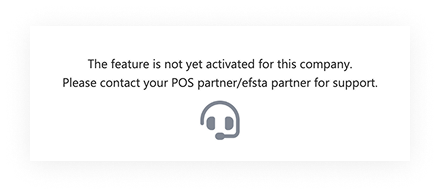
To enable the automatic reporting, please contact your POS provider directly to check whether the contractual basis is already in place for this add-on.
Complete data entry
To ensure successful reporting, certain data needs to be properly provided first:
Elster Contacts
First, please provide an email address to transmit the legally required XML files for reporting to MyElster.
We recommend using general company mailboxes such as "accounting@customer.de" instead of personal employee addresses. This ensures reliable delivery of the data even in case of staff changes.
Since company and contact details can be maintained either by the efsta partner or by the taxable end customer, we offer two options for data maintenance:
- Direct editing in the efsta portal (at company level)
- Data export and subsequent import via CSV files (at organization level)
This means: depending on user permissions, data can either be entered for each company individually directly in the efsta portal, or all customer data can be exported at organization level, updated, and re-uploaded via CSV to update multiple companies at once.
Location Data
The taxpayer’s location data must be entered correctly to ensure legally compliant reporting of POS systems to MeinElster.
For both new and existing POS system installations, it must be checked in the efsta portal whether the value “Internal Branch ID (Int. FILIAL ID)” matches the TL (Terminal Location) in the EFR (see fiscal requirements KassenSichV).
Check existing locations
- Open the efsta Portal and select „Locations“ in the main navigation
- Click on the corresponding location name
- Navigate to the “Properties” menu and click “Edit”
- Check the value of the Internal Branch ID
Add new locations
- Open the efsta Portal and select „Locations“ in the main navigation
- Click “Add”
- Fill in the field “Internal Branch ID” in the overlay
Company Data
Verification and maintenance of company data in the efsta portal is essential to export data correctly and thus meet the reporting obligation. Please check that all data is complete and correct, or add missing information as needed, particularly in the following fields:
- Name
- Street
- Postal code
- City
Check existing companies
- Open the efsta Portal and select "Companies" in the main navigation
- Click on the corresponding company name
- Navigate to the “Properties” menu and click “Edit”
- Review the content and adjust it if necessary
Terminal Data
Terminal (POS) data must be entered correctly to ensure legally compliant reporting of POS systems to MeinElster. The following details, which are also required for the DSFinV-K export, must be validated or added if missing:
- Software
- Serial number
- Manufacturer
- Model
If no serial number is stored in the portal, the assigned TL/TT will be used as the serial number instead. These data can be maintained either via the EFR interface or directly in the efsta portal. We recommend maintaining them via efsta EFR – manual entry in the portal is optional. The data fields are transferred to the efsta portal through the EFR interface. However, additional data still needs to be reviewed or supplemented.
Due to the most recent amendment of the reporting obligation by the BMF, the software version (DE_SW_Version) is no longer a mandatory field.
Maintenance in the efsta portal (optional)
- Open the efsta Portal and select "EFR" in the main navigation
- Click the cloud icon for the relevant entry
- Select “Terminal”
Data Validation
You can start an export to get an overview of all recorded reporting data:
- Open the efsta Portal and select "Portal Export" in the main navigation
- Select export type “Elster Data”
- Choose the appropriate organization
- Click “Download as CSV”
Please note that this data export is for validation purposes only. Re-uploading the edited data to the portal is not possible (Alternative: API call).
Order/activation of the automated reporting service per location (business establishment)
With the following process you can request the automatic reporting service:
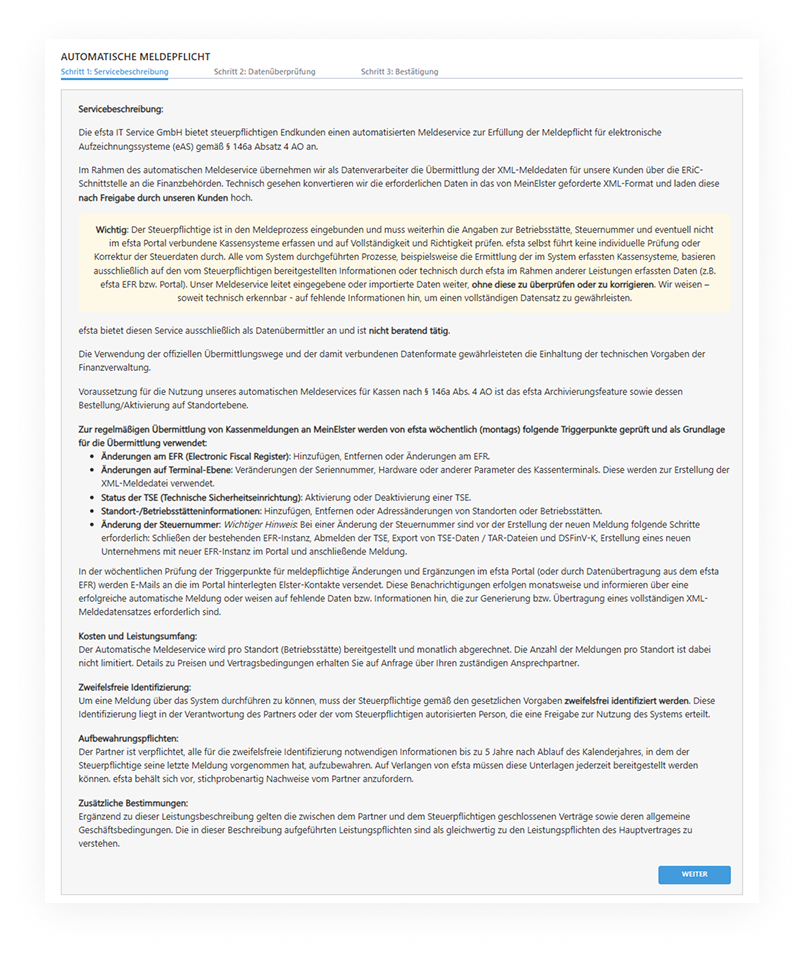
1. Activate the service
- Open the efsta portal
- Navigate to "Fiscal reports" in the main navigation

- Select your company from the dropdown list
- Click "Order automatic reporting"
- Read and confirm the service description
2. Create a contact
- In the next step, please create a contact address as the ELSTER contact. Information emails will be automatically sent to this address (we recommend using a functional or departmental email address). Please mind, the entered email address must be confirmed via a link. You will receive a confirmation email.
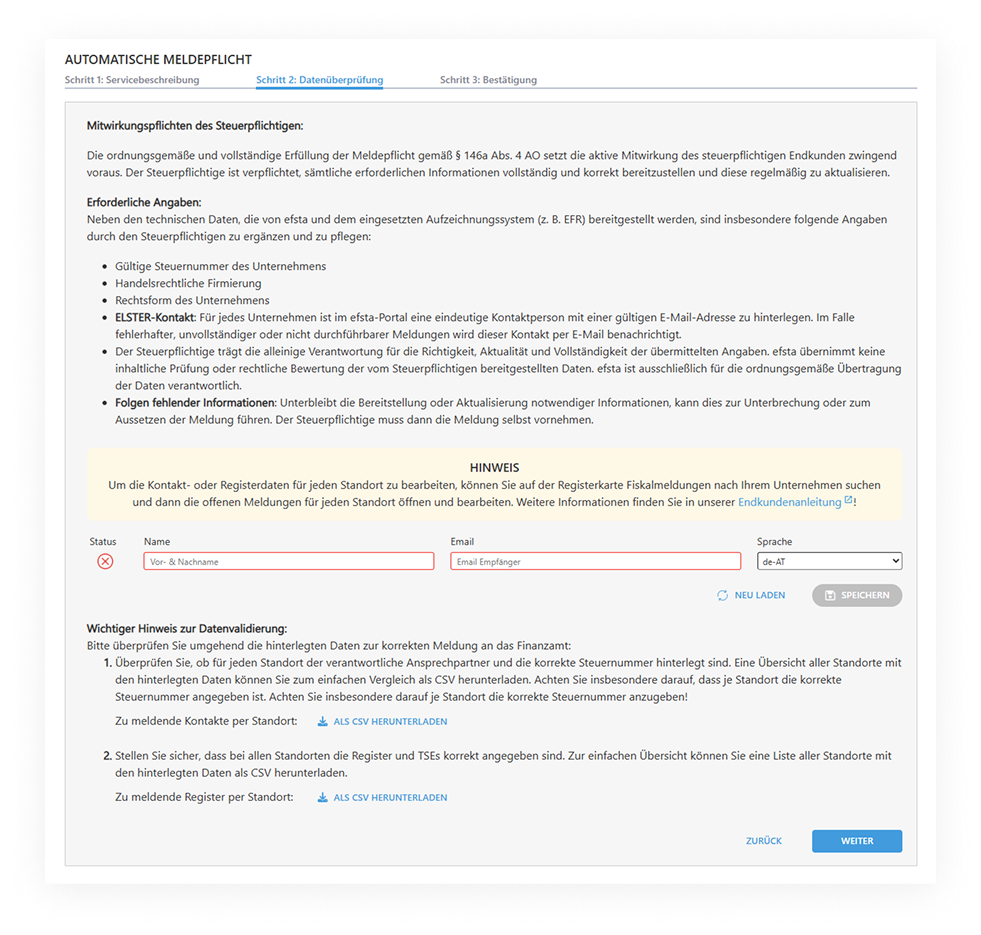
- Confirm the email address using the link in the confirmation email
- Then click "Reload" in the portal
3. Check & complete mandatory data
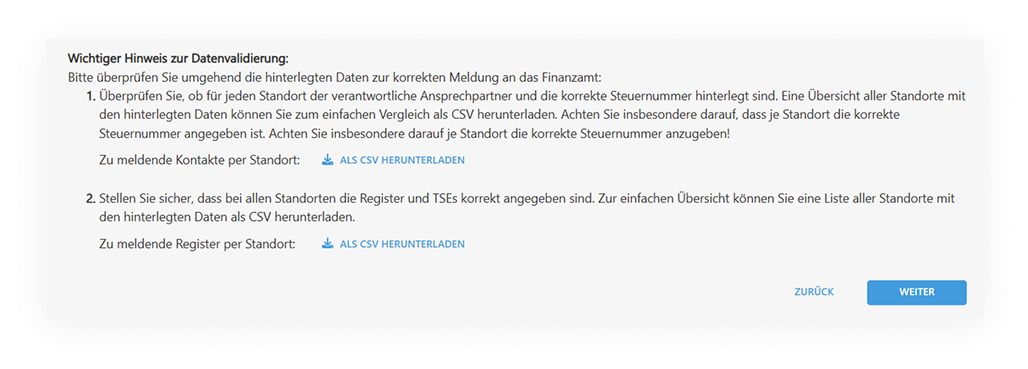
-
Under Download contacts, download a CSV file containing stored Elster contacts per location. Review and, if necessary, complete missing details directly in the portal.
-
Under Download location, you will receive a tabular overview of all legally required fields per location. Complete or correct these if necessary, otherwise no report file can be generated.
4. Complete the order
- Enter your name and function, then confirm the order
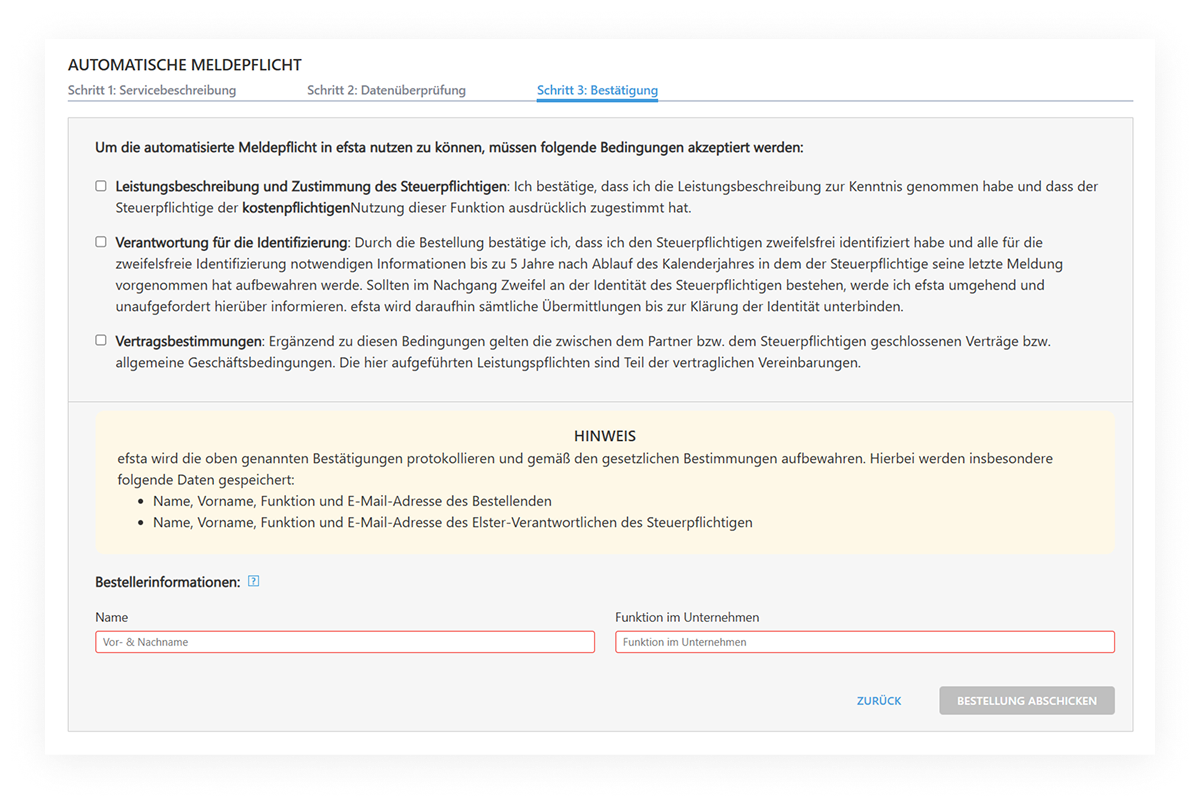
- You will then receive an order confirmation by email. Billing will be processed as usual together with the EFR billing.
If you receive a notification by email that the automated report could not be transmitted due to insufficient data quality, please follow the instructions in the email:
check the reporting data of the specified location in the efsta portal and complete the missing information.
Notifications & Status Overview
efsta checks so-called trigger points weekly (see below) for reportable changes (see section "Overview of our efsta Solution").
-
Upon successful transmission, Elster contacts will automatically receive a confirmation email including a PDF protocol link for download. This is also available at any time later under Fiscal Reports > Confirmations. Since the automated reporting service runs via the efsta Elster certificate, successfully submitted data will not appear in other MeinElster accounts. We therefore recommend filing the PDF protocol in your procedural documentation.
-
If mandatory fields or data are missing, you will be notified by email. Please complete or correct the data in the portal. As soon as all required fields are filled in, a new transmission attempt to MeinElster will automatically start again on Monday.
Only if deadlines must be met (e.g. new cash register/change must be reported within one month) should reports be created/downloaded manually and uploaded to MeinElster independently.
Report Status
In the efsta portal you will find the following status indicators for your reports:
- Open
- Created
- Sent
- Error
(Not yet completed)
An open report should be processed. It can be created manually, downloaded, and subsequently uploaded independently into MeinElster. Alternatively, this will automatically be processed by efsta in the weekly automated workflow. If you have not ordered the automated reporting service but have stored an Elster contact in the portal, you will receive a reminder every Monday that there is a reportable data change in a location report (e.g. new TSE, new POS serial signature), which requires a new manually uploaded report in MeinElster.
(File has been generated)
The status "Created" is only displayed to portal users who have manually created a POS report. If you are using the automated reporting service, you will only see POS reports here that you have manually generated.
Reports created here in XML format can no longer be changed within the efsta portal. First, you can open the report using the "Download" button. With the "Download Report" button, you can download the XML file for further processing in MeinElster.
(Successfully transmitted)
The status "Sent" is displayed to portal users using the automated reporting service. Upon successful transmission, you will receive a confirmation message with a PDF download of the efsta transmission protocol. Here you can see, for each location, when transmissions were successfully completed. If needed, you can download these reports via the "Download" button for your own archiving. This transmission protocol should preferably be filed with your procedural documentation. These messages remain permanently available online, securely archived for audit purposes, and can also be downloaded/exported individually at any time.
Please note: If a report has been manually saved and downloaded, it will be set to "Created" within the system. To avoid duplicates, automated reporting will then be systemically blocked and must be performed manually.
(Transmission failed)
The status "Error" is displayed to portal users who either use the "Create and download all open reports" button or use the automated reporting service but still have locations with incomplete data. In this case, no report can be created due to missing information. These data must be provided by the taxpayer (note: the taxpayer has a duty to cooperate here).
Within the weekly automated workflow (every Monday), a new open report is always generated after an error, prompting you to complete the missing data.
Follow the end customer guide to correct potential error sources such as incorrect tax number format or missing data.
Once all data fields are completed, a new open report can either be created and processed manually or automatically transmitted via the Monday workflow.
FAQ about the Automatic Reporting
What happens if data is incomplete?
You will automatically receive an error message by email with a specific note on which details are missing or incorrect.
How often does the automatic check/reporting take place?
Every Monday, the system checks all locations for reportable changes (“trigger points”). If the dataset is complete, transmission to the tax authorities/MeinElster takes place immediately.
Can I download/submit reports myself?
Yes, this is possible, for example if deadlines must be met. You can generate and download the report in the efsta portal and upload it independently to MeinElster.
Where can I find my submitted reports/protocols?
All protocols are permanently available for download under Fiscal Reports > Confirmations.
Manual Reporting
Prerequisites for the reporting service
efsta Archiving Feature
One of the basic requirements to use the efsta reporting service for cash registers according to § 146a paragraph 4 AO is the efsta archiving feature. If this service has not been added/activated yet, please contact your cash register manufacturer to unlock this function!
Adding an Elster contact
Furthermore, an Elster contact must be entered in the efsta Portal at company level.
Adding a new Elster contact in the efsta Portal
- Open the efsta Portal and navigate toc "Companies" in the lefthand menu.

- In the properties of your company, which can be accessed by clicking the name or three-dot-icon, you will find the tab "Elster Report". There, please continue with the button "Enter elster contact".
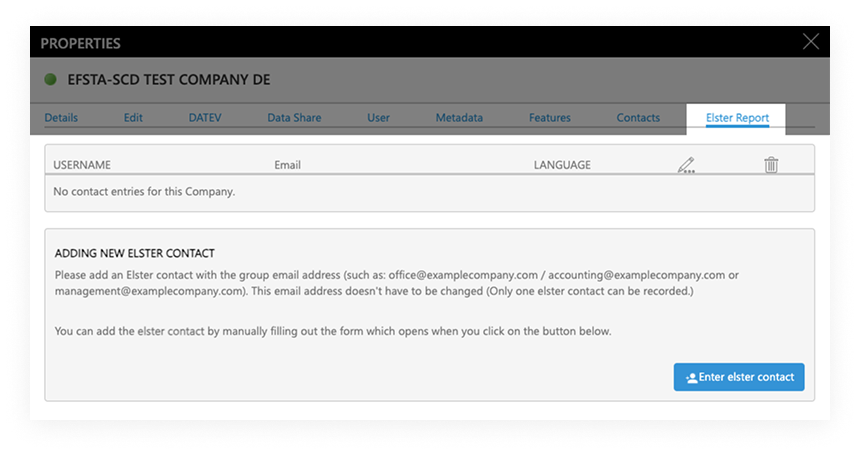
- Fill in the form and complete any fields with red frame to ensure the report is correct.
- In the Language field, please select the language in which you would like to receive our information emails.
- If the terminology of the fields is unclear, please use the glossary at the end of the page or the help texts in the efsta portal.
We recommend using an office mailbox such as "buchhaltung@kunde.de"
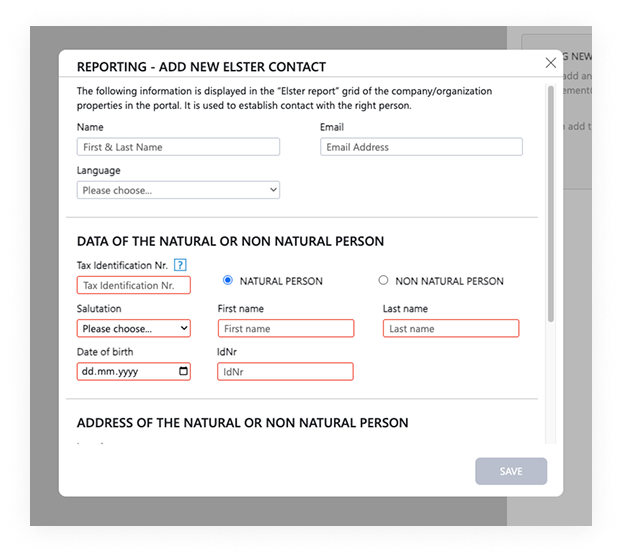
- Once all fields have been properly filled in, you may click the button "Save".
When using a spam filter, we recommend whitelisting the email address noreply@efsta.net to ensure the delivery of emails.
The email address entered at this point will receive a verification email after the contact has been entered - please also check your spam folder and click on the confirmation link contained in the email. Afterwards, the messages are sent every monday, during the weekly email service - for this reason the Elster contact may not receive the first message until a few days later, on the following Monday!
Email notifications
Since 13th of January 2025, the efsta email service for mandatory reporting is active. After the weekly check of trigger points for reportable changes/additions in the efsta portal, or by data transfer from the efsta EFR, emails are sent to the Elster contacts stored in the portal. This way they can download the currently recorded data necessary to fulfill the obligation from the Portal via link.

Download of the reporting data (XML)
To edit the reporting data, please either click the link in your weekly email to receive the XML file, or follow this guide to open the report in the efsta Portal at any time.
Retrieving open reports via efsta Portal
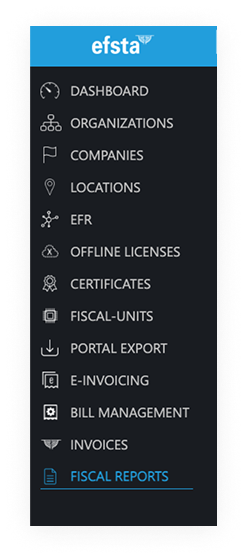
- Select “FISCAL REPORTS” in the lefthand sidebar
- Choose your company and optionally a location
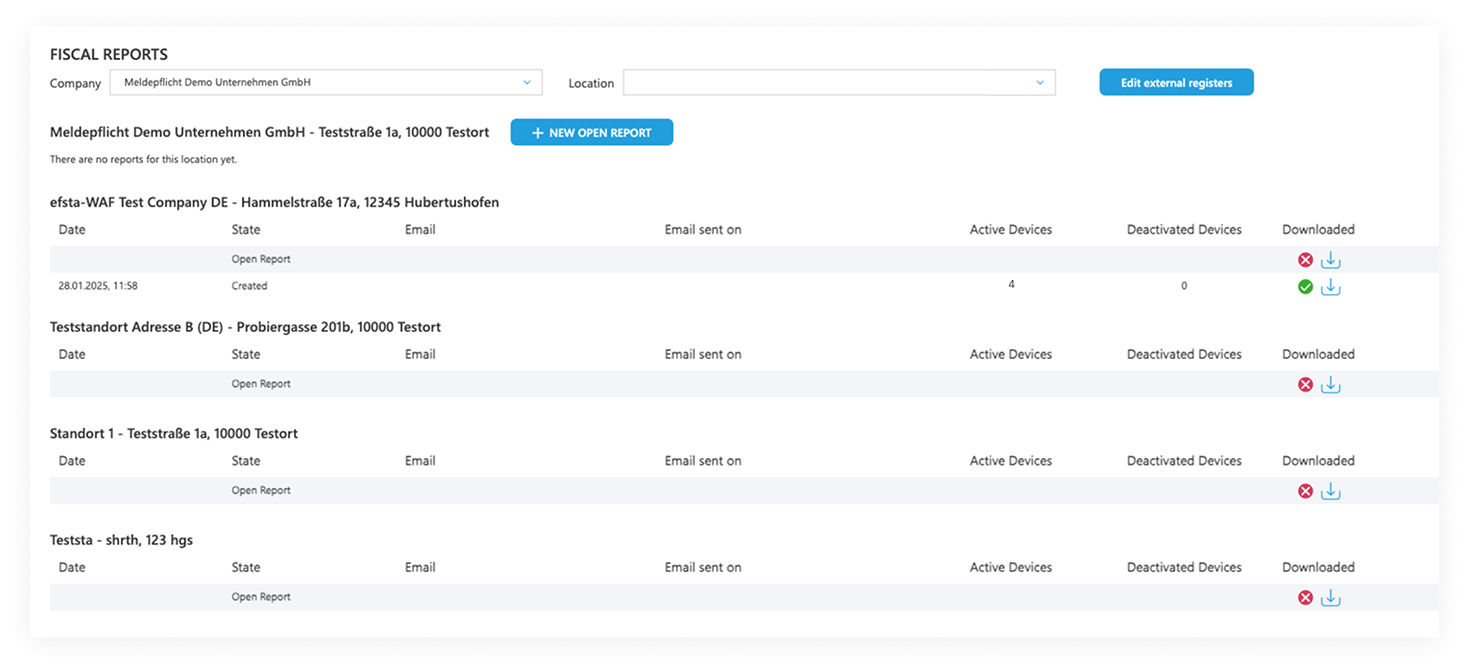
- Next, click the download button
- The status next to it shows whether the report has previously been downloaded and as such completed. A red "x" means that the data has not been downloaded yet and might still need to be revised first.

- If there is no report available, or you wish to add manual changes, click on the button “New Open Report” by the appropriate location in order to create a new file with current data.
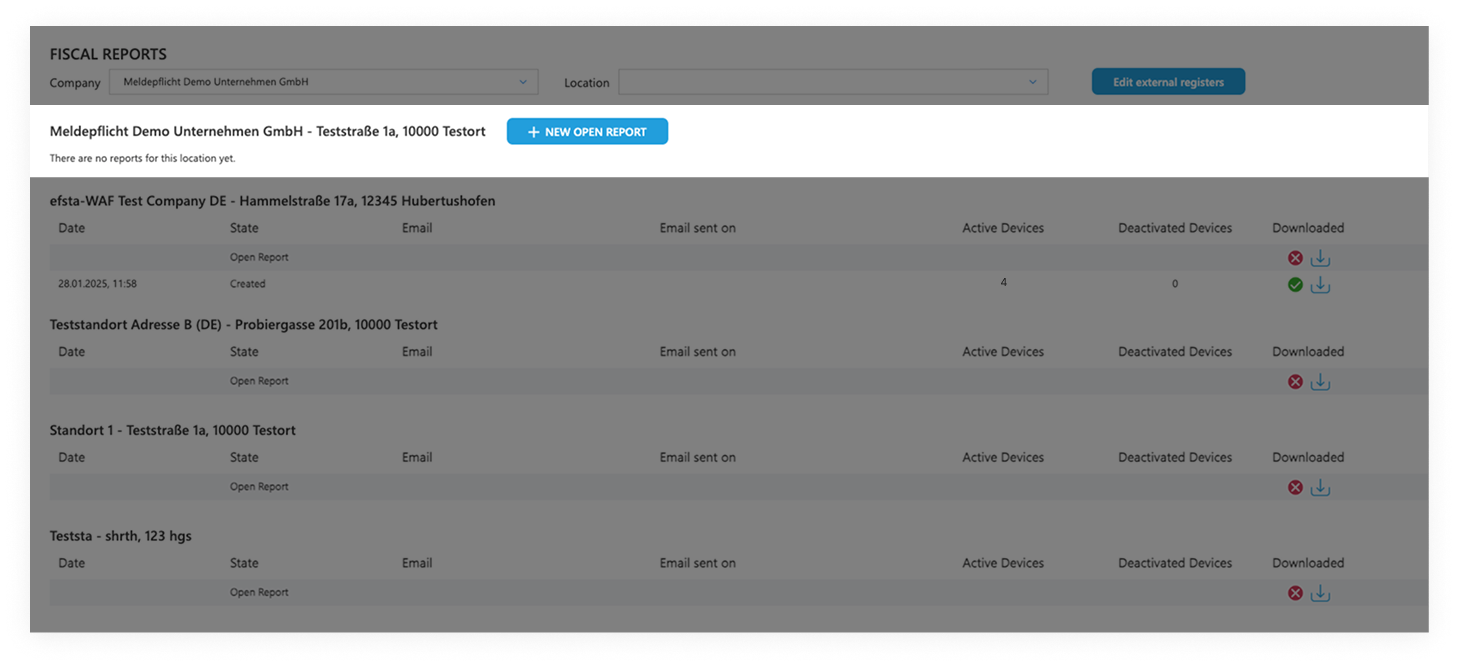
To download this data via email link, access permissions to the Portal are not required!
Editing the report data
Fields which are missing information/ in order to fulfill the reporting obligation will be highlighted with a red frame. Please complete ALL fields marked in red in order to create a correct XML file, otherwise you will be unable to proceed. Furthermore, any manual changes or deviations from the last, successful report will be displayed in orange frame and transferred to the efsta portal, as well as the EFR once the changes have been saved.
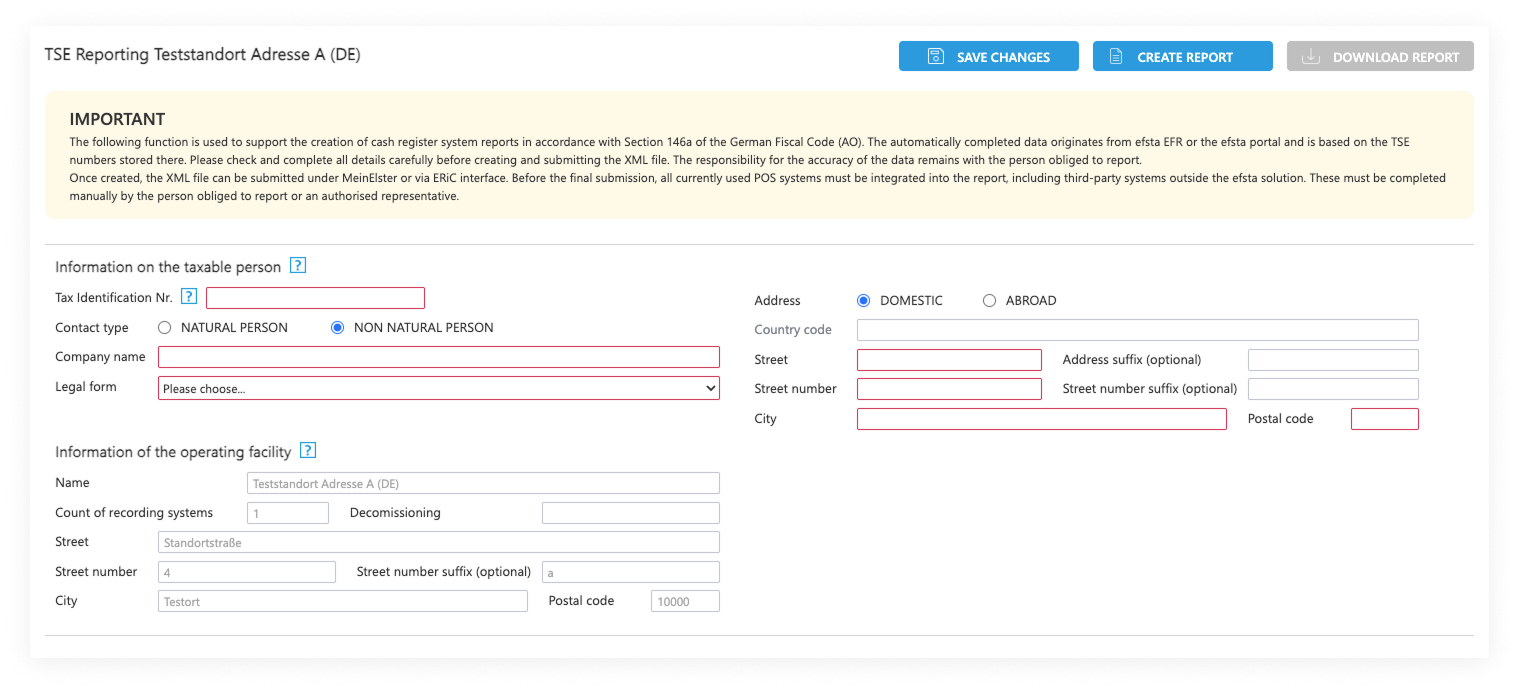
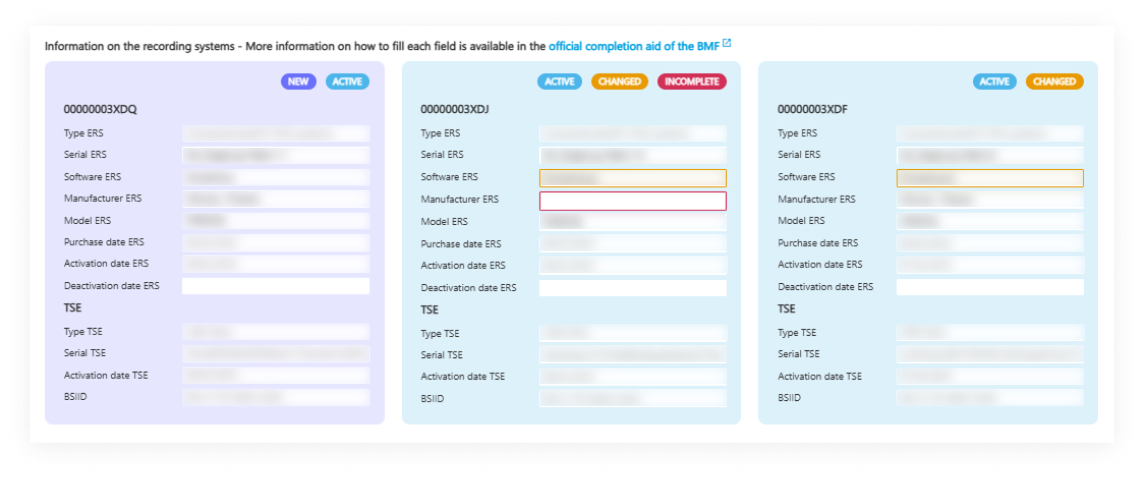
Details about the company name and legal form you can find in the glossary at the end of the page.
Please add the purchase- or commissioning date of your eAs (POS system) or, if applicable, the decommissioning date. In the efsta Portal, the date fields are prefilled according to the following criteria:
- Purchase date eAs: is the date of EFR creation
- Commissioning eAs: is thedate of the first transaction
After you have completed / checked all data and clicked on DOWNLOAD REPORT, please confirm this pop-up window. Then you can continue with "Create Report".
Once all the data for the report is filled in, click on "Create Report" and, after careful review, approve the displayed disclaimer. Afterwards, you can continue in order to download the file according to standard settings (f.e. download folder).
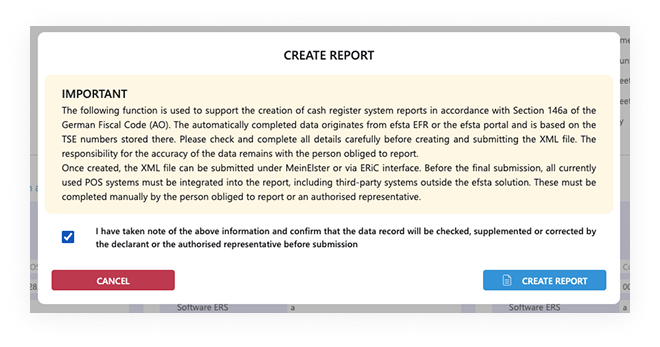
The TSE data (incl. BSIID) is transferred via efsta EFR and used for reporting. If some fields have not been filled in automatically and you are unsure on what to add, please use the official completion aid of the BMF.
External cash registers / eAs
The BMF requires taxpayers to submit ONE report of electronic recording systems (eAs) per business premise. If you are using other external cash registers / eAs at your business premise, you can put them in manually at the efsta portal. This way they will show up in the collected data export. At the latest they MUST be added in the Elster portal (see chapter Data maintenance, verification and completion in MeinElster).
 What are external registers?
For example, you use two different POS solutions in your hotel business - one for managing the hotel (PMS) and a POS system in the affiliated restaurant. If the PMS system is fiscalized with efsta, all relevant information for processing in MeinElster is contained in the XML file. The cash register system of the restaurant however is NOT included due to the lack of connection to efsta - it is now the responsibility of the taxpayer to manually enter all legally required data in MeinElster.
If you wish to add the missing data in the efsta portal, please follow these instructions:
Adding and editing external cash registers in the efsta Portal
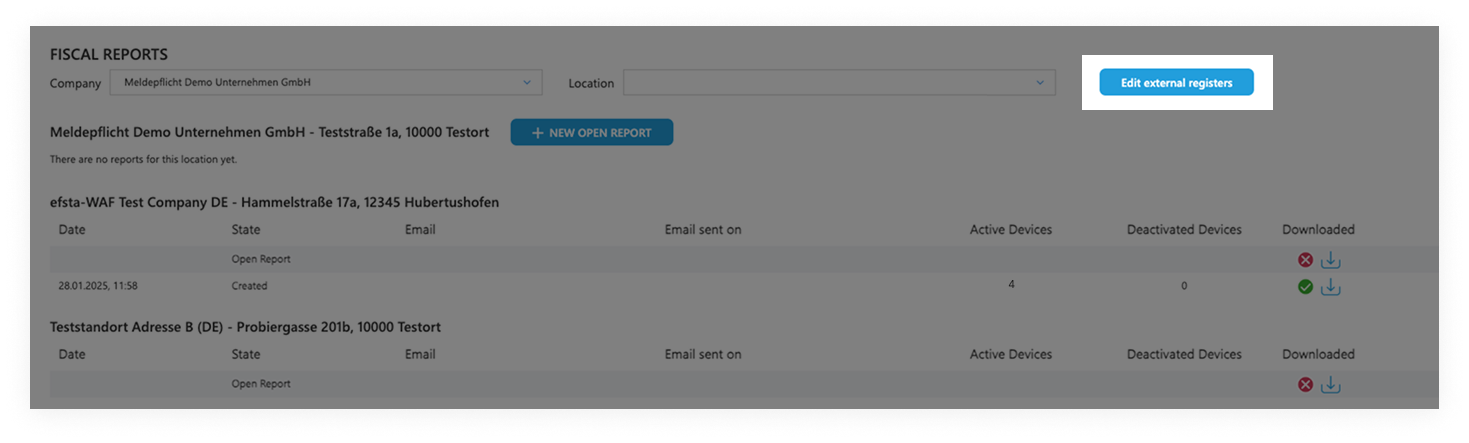
- Select “FISCAL REPORTS” in the lefthand sidebar
- Choose your company and optionally a location
- Click the button "Edit external registers"
- On this page you can now define external registers for the company or location previously selected. Both the direct input in the efsta portal, as well as a CSV-import are available here. To facilitate the data input, please use the completion aid of the BMF.
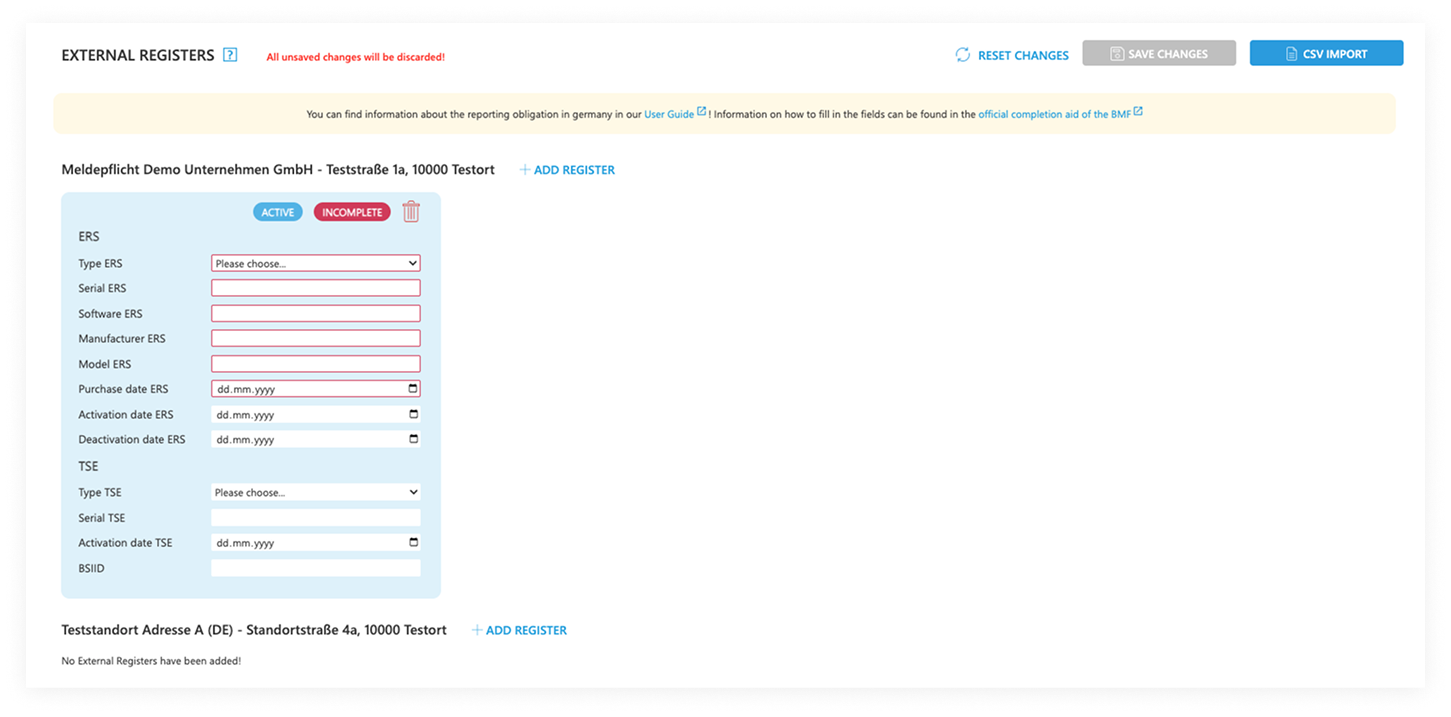
Please mind that we apply the gross method to the CSV import. This means that only the cash registers defined in the new import would apply, whereas all existing data would be overwritten.
External cash registers are treated like normal cash registers in all reports, so when there are changes, the weekly email service will be triggered as well. This way you can also edit the external registers with the link contained in the weekly email.
MeinElster Portal
The following section describes how to upload the XML file in the MeinElster portal, as well as reviewing and submitting the file.
MeinElster Login & File Upload
Instructions on uploading the XML from the efsta Portal
- Click this link to open the MeinElster portal (only available in German): https://www.elster.de/eportal/login/softpse
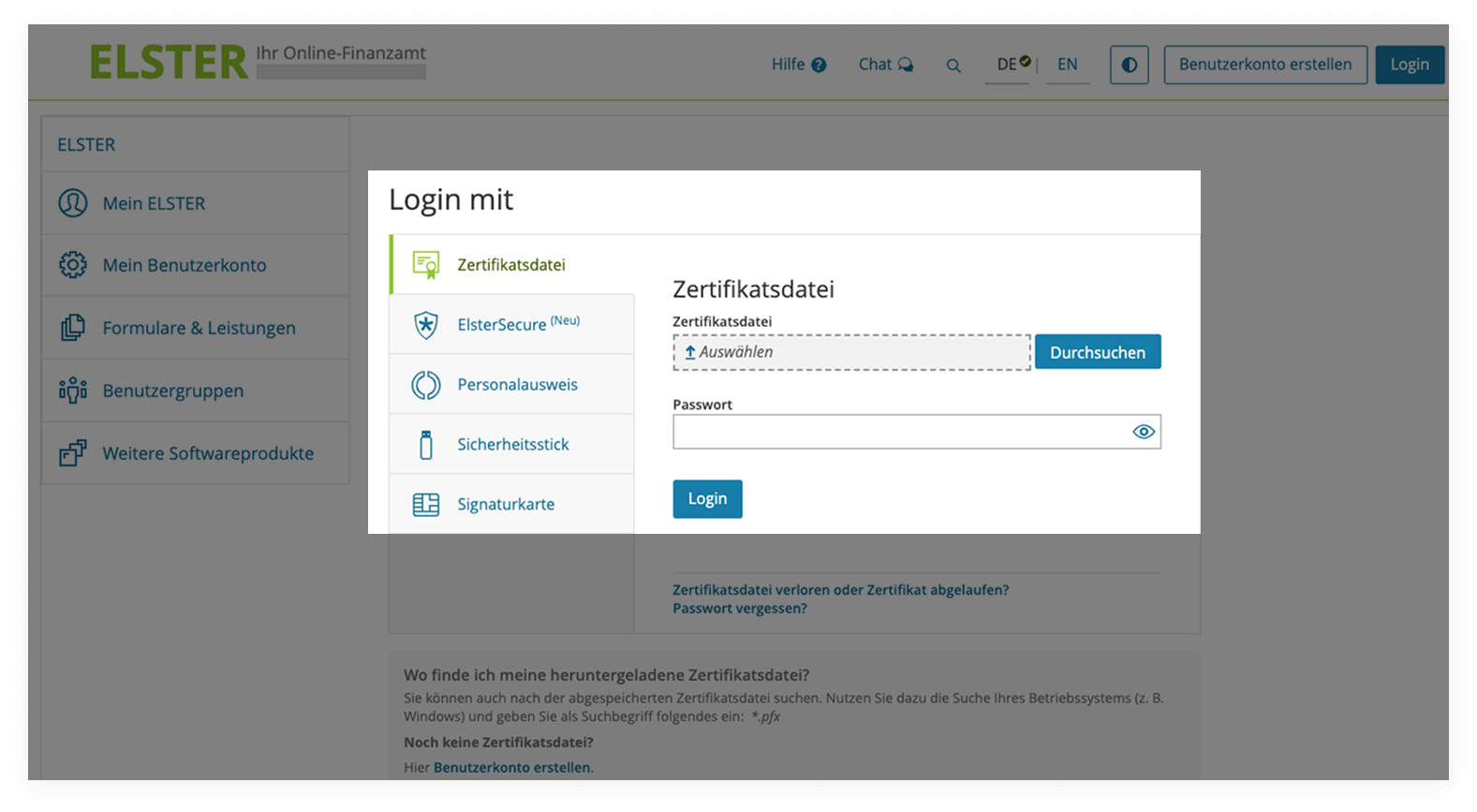
- Please upload your certificate file (*.pfx) and enter your password.
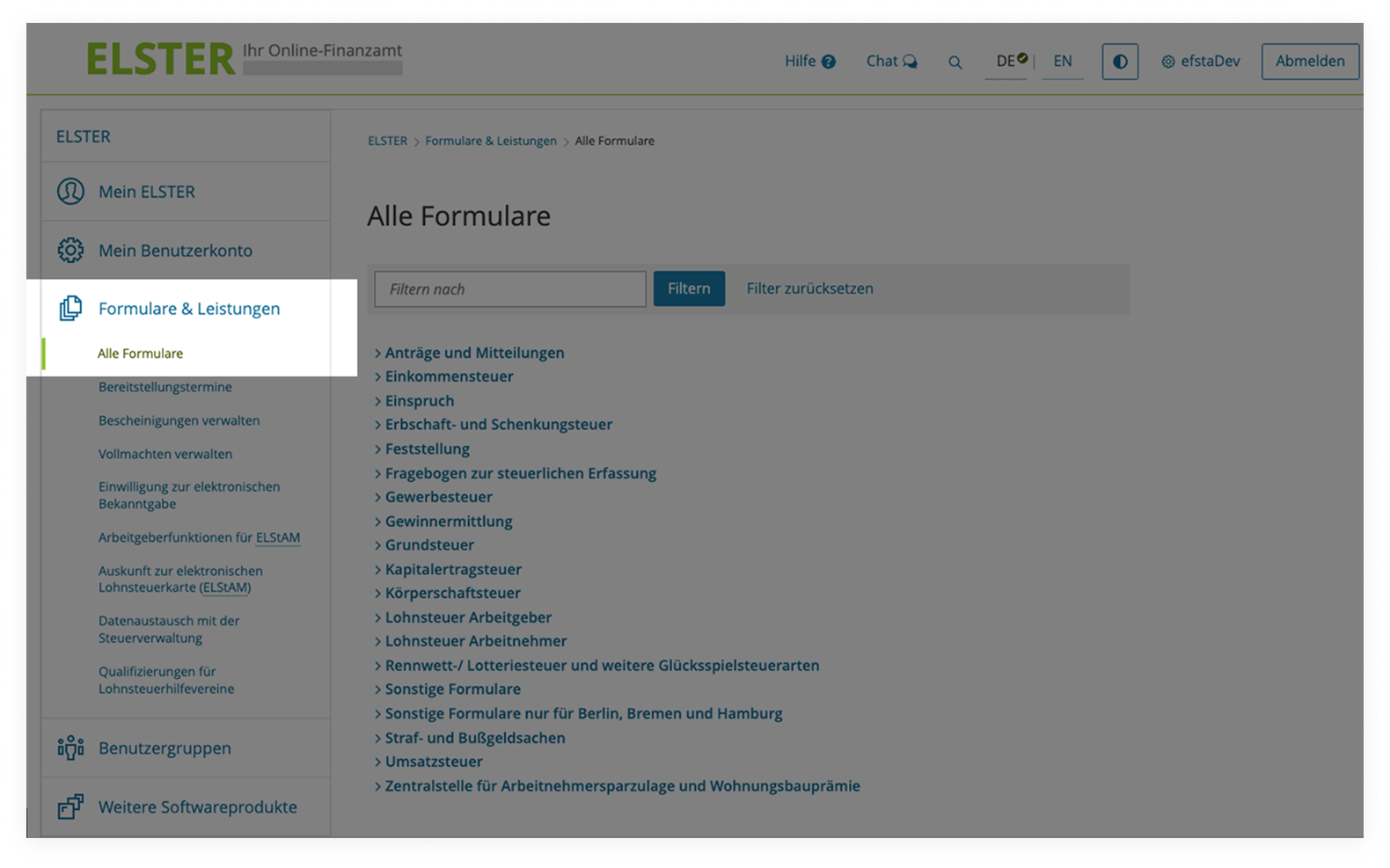
- After successful signup, please navigate to “Formulare & Leistungen”, followed by “Alle Formulare” in the lefthand menu.
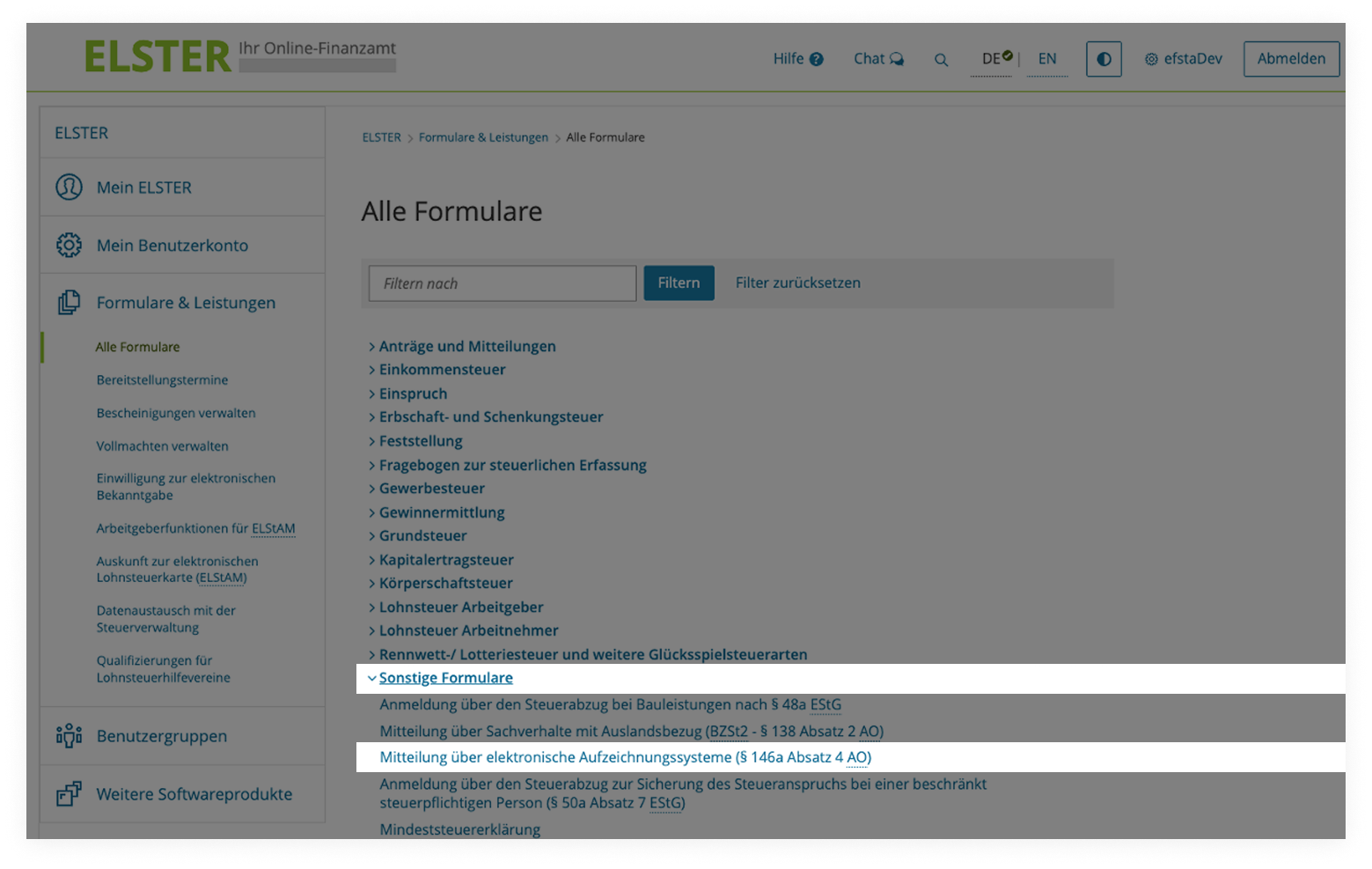
- Now click on „Sonstige Formulare“ in the main window to expand the section accordingly, and continue with „Mitteilung über elektronische Aufzeichnungssysteme (§ 146a Absatz 4 AO)"
-
Proceed by clicking the “Weiter” button and, on the next input screen, enter the date for recording the cash register report in the format “DD.MM.YYYY”.
-
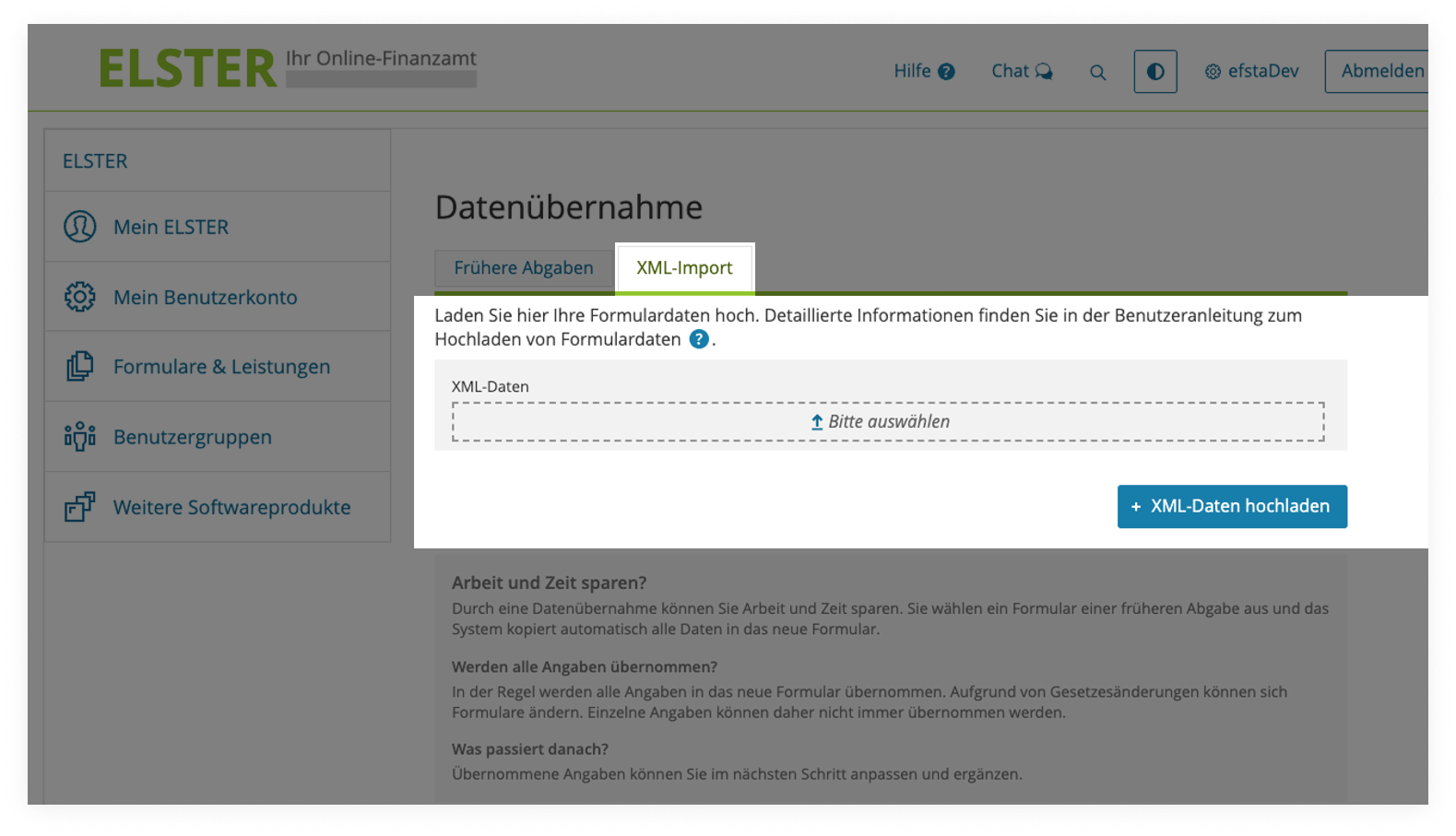
Finally, please click on the “XML import” button, drag and drop the XML file downloaded from the efsta Portal into the provided “XML data” field and confirm this by clicking on “Upload XML data”
Data maintenance, verification and completion in MeinElster
Finalizing the XML file
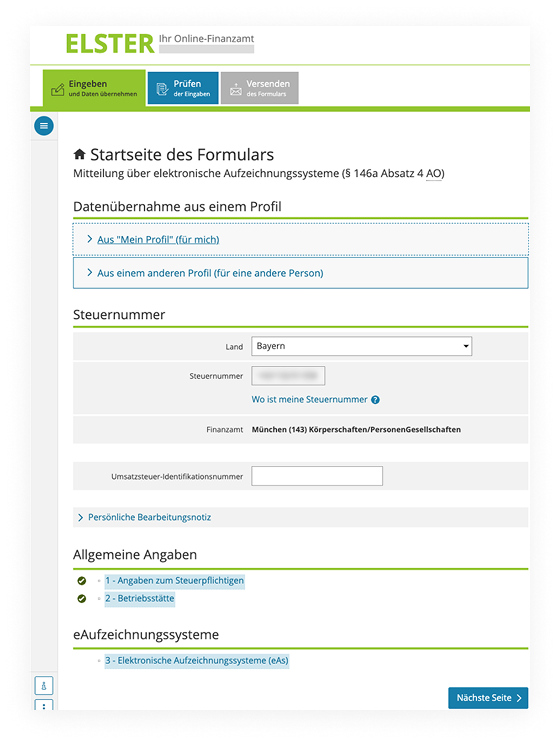
- Please verify the correctness of the country and tax ID and continue with "Nächste Seite".
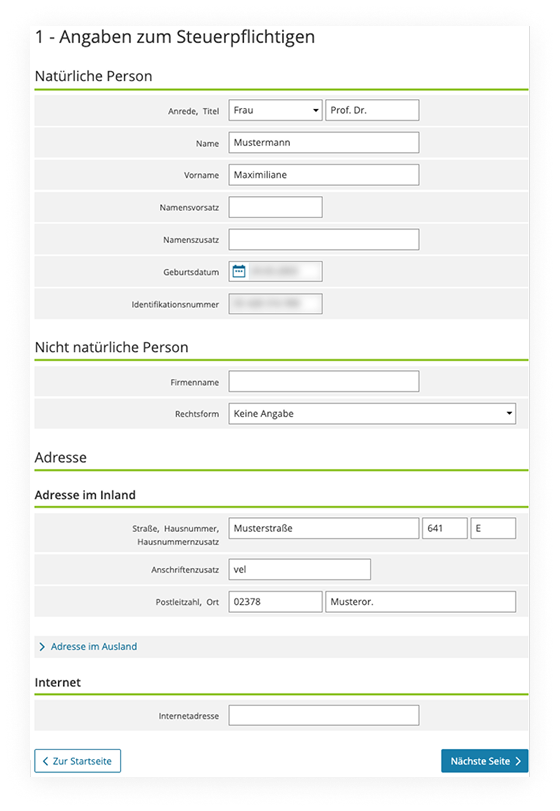
- Next, verify or complete the details of the taxable person if necessary and then click on “Nächste Seite”:
- Please enter the label of the business establishment here (e.g. branch XYZ)
- Then, check the number of assigned electronic recording systems (eAs)
- If you are reporting the deactivation of a cash register, please enter the date of decommissioning here and click on „Nächste Seite“.
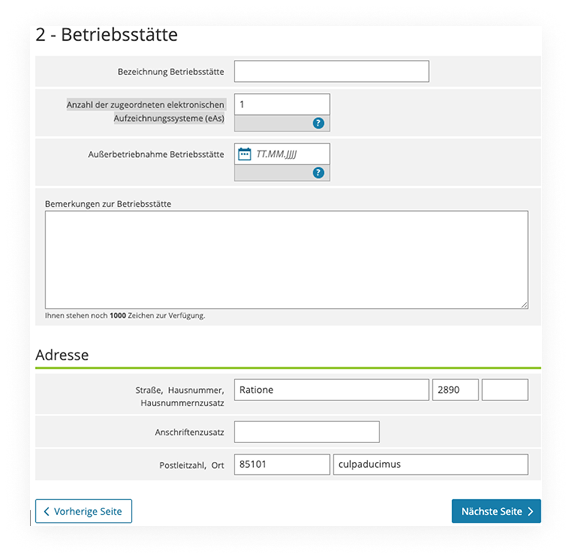
The BMF requires taxpayers to submit ONE report of electronic recording systems (eAs) per business premise. If you are using other external cash registers / eAs at your business premise which are not included in the data export from the efsta Portal (see chapter External cash registers / eAs), these MUST be added in next step of the Elster portal.
Adding further recording systems (eAs)
- After the successful XML upload, click on “Elektronisches Aufzeichnungssystem hinzufügen”
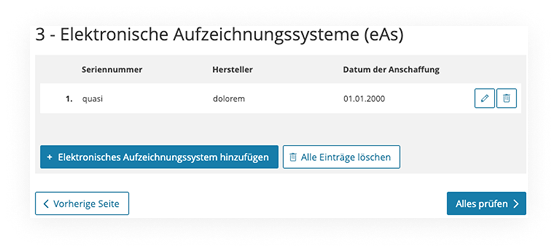
- Enter the required data using the BMF's completion aid
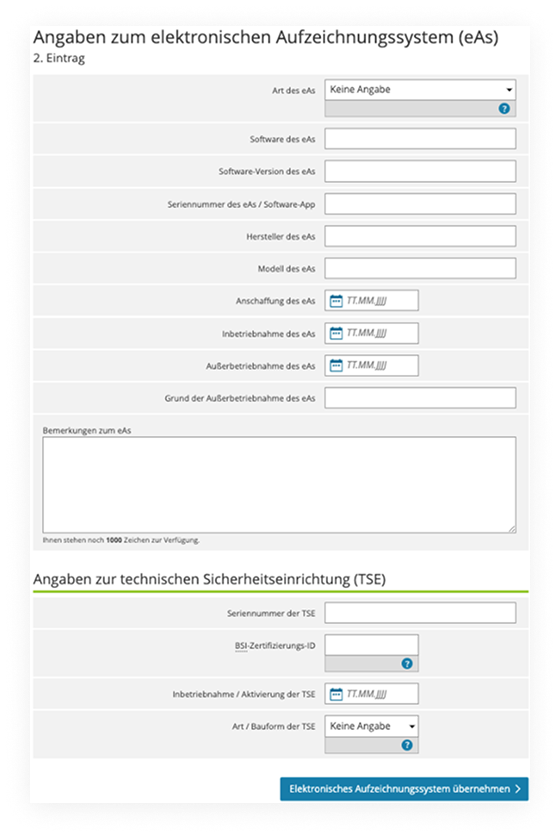
- Complete the form with the button "Elektronisches Aufzeichnungssystem übernehmen"
Verification & submission of the report
Please note that you currently must report each business premise individually - a single, collective report is not possible at the moment!
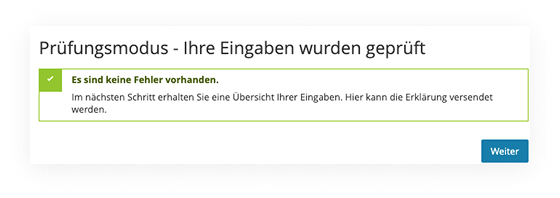
- Once the XML and all necessary eAs have been added, continue by clicking on “Alles Prüfen”
- If all information has been entered correctly, the message "Es sind keine Fehler vorhanden" is displayed. Please click on “Weiter”.
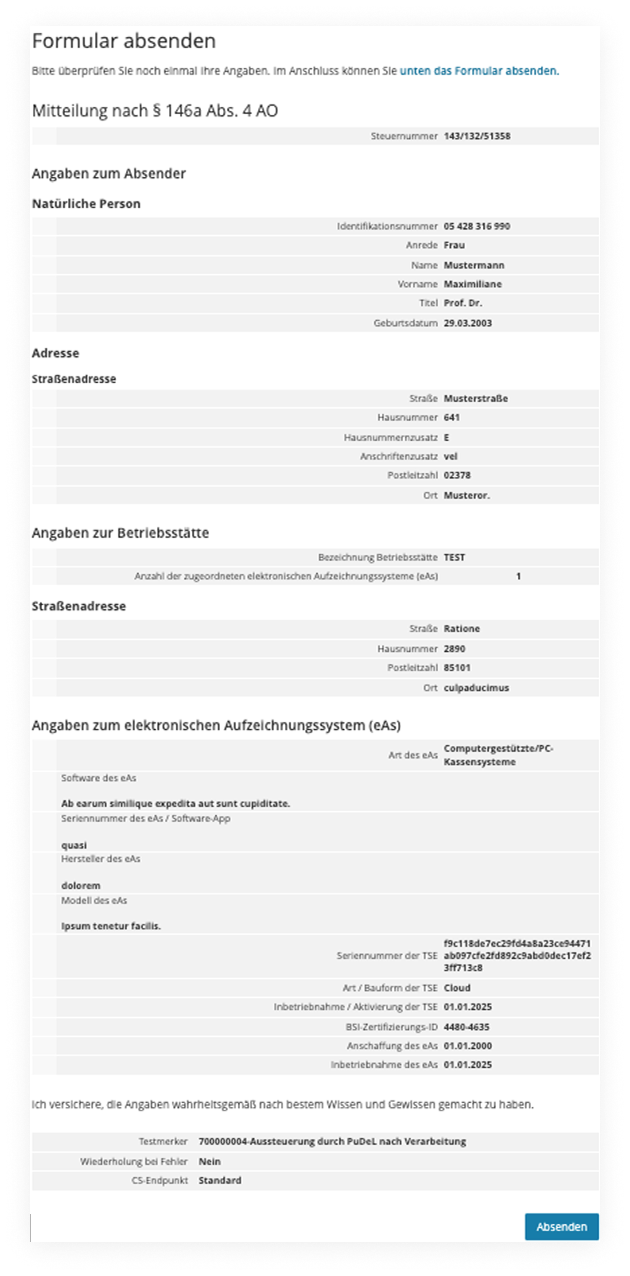
- In the summary you will see all the data you have entered - if it is correct, click on “Absenden”.
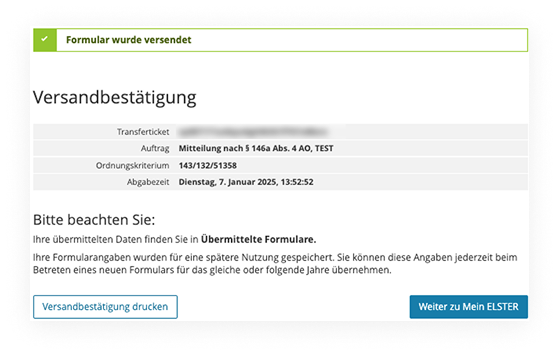
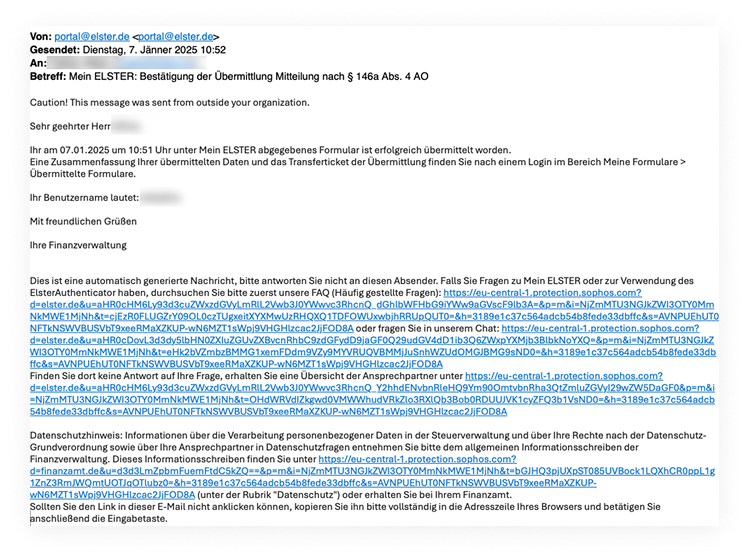
- After submitting the file, you can download or print the transmission protocol. You will also receive an email confirming the transmission of the cash report.
Glossary
BSIIDStands for the certification number of the TSE used, which can be found on the BSI website - the BSIID is automatically transferred to the XML file by linking the TSE in the efsta Portal (including the TSE serial number and the commissioning date).
TSE Serial NumberThe serial number of a TSE (technical security device) is a unique identification number, assigned to a specific TSE unit by the TSE manufacturer. It is used to uniquely identify the respective security device within the framework of the German Cash Register Security Ordinance (KassenSichV).
Natural person / non-natural person- Natural person: People with full legal capacity from birth who are personally liable and hold fundamental rights.
- Non-natural person: A non-natural (legal) person is not a person in the literal sense. Rather, it is an association of several people or their assets. A legal entity can therefore be an association of persons or an estate. Legally created constructions that act through bodies, have limited liability and no fundamental rights, but are the bearer of rights and obligations. They represent the company in the corporate context: GmbH, GBR, AG, etc.
Tax identification number (TID)The tax number in Germany is a unique identification number issued by the tax offices to manage taxable persons and companies under national tax law. It serves as the basis for handling all tax matters, in particular communication with the tax office.
The tax identification number must be entered in the standard federal format for electronic transmissions and consists of 13 digits with no special characters. You can use the official online calculator to convert your 10- or 11-digit TIN to the standard 13-digit national format.
VAT ID (UID)Number for companies which participate in intra-community trade within the EU. The UID number begins with the country code “DE” for Germany, followed by 9 digits, e.g: “DE123456789”
Business PremiseA business premise is a physical facility that has a certain degree of permanence and serves to carry out business activities.
eAs – electronic recording systemAn electronic recording system (German: eAs elektronisches Aufzeichnungssystem) in Germany is according to § 146a the tax regulations (AO) a device or software that is used to record business transactions, in particular cash receipts and expenses. Electronic recording systems are typically electronic-, or computerized cash registers, scales with cash register function or comparable systems that are used to record tax-relevant business transactions.
Company nameThe company name under commercial law is the official name that is entered in the commercial register and must meet certain legal requirements.
Legal formAll legal forms listed in Elster can be selected. If your legal form is missing from the selection menu, please f.e. choose the option used for your advance VAT return.